#34833: "Board positioning: avoid requiring scrolling where possible"
Petra a zo c'hoarvezet ? Trugarez evit dibab amañ dindan
Petra a zo c'hoarvezet ? Trugarez evit dibab amañ dindan
Gwiriit mar-plij ma n'eus ket dija un danevell evit an hevelep dodenn
M'oc'h a-du, VOTIT evit an danevell-mañ. An danevelloù gant ar muiañ a vouezhioù a vo studiet DA GENTAÑ !
| # | Status | Votes | Game | Type | Title | Last update |
|---|
Deskrivadur dre ar munud
-
• Mar-plij, eilit/pegit ar gemennadenn fazi a zo war ho skramm, ma zo unan.
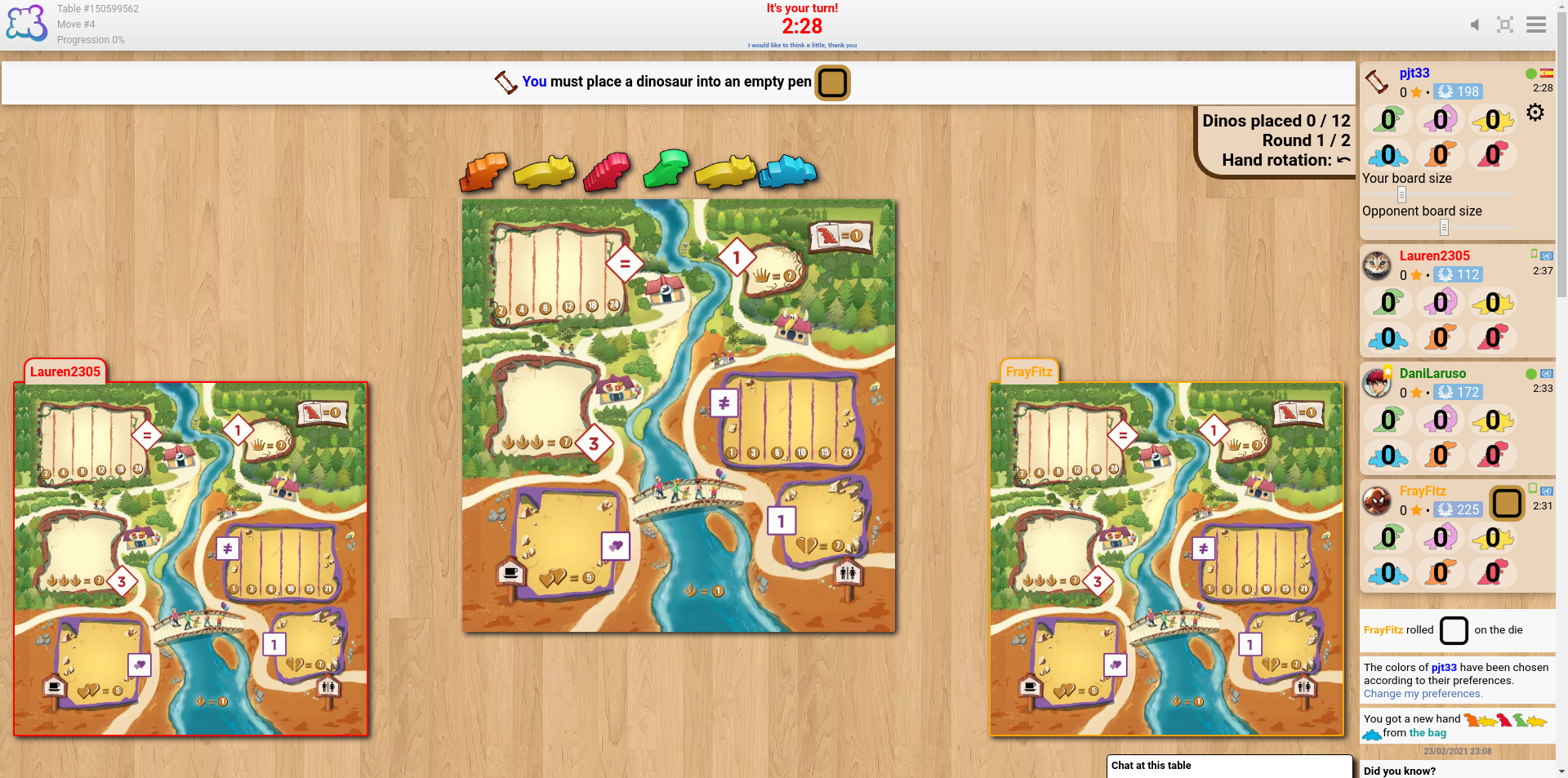
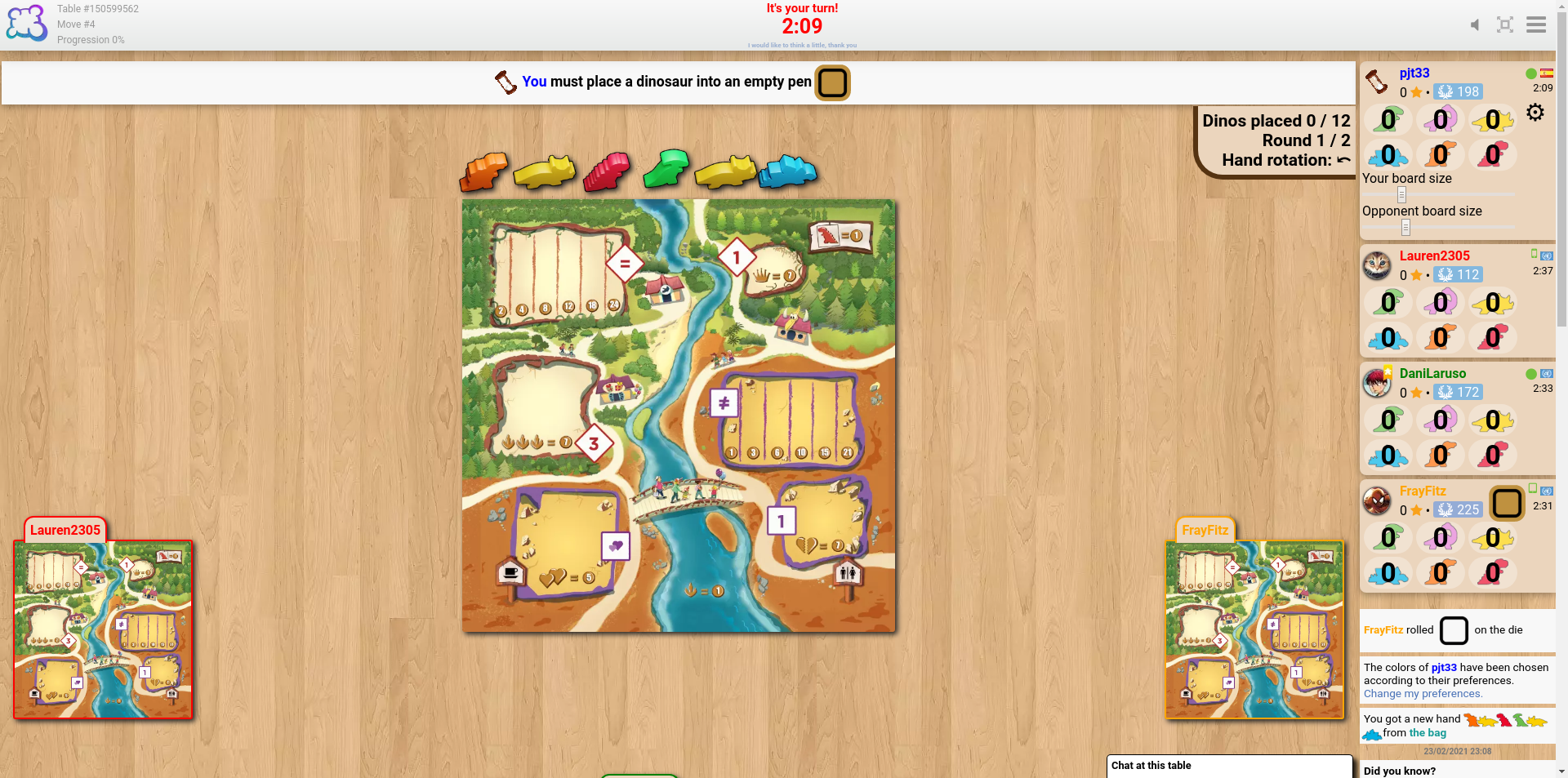
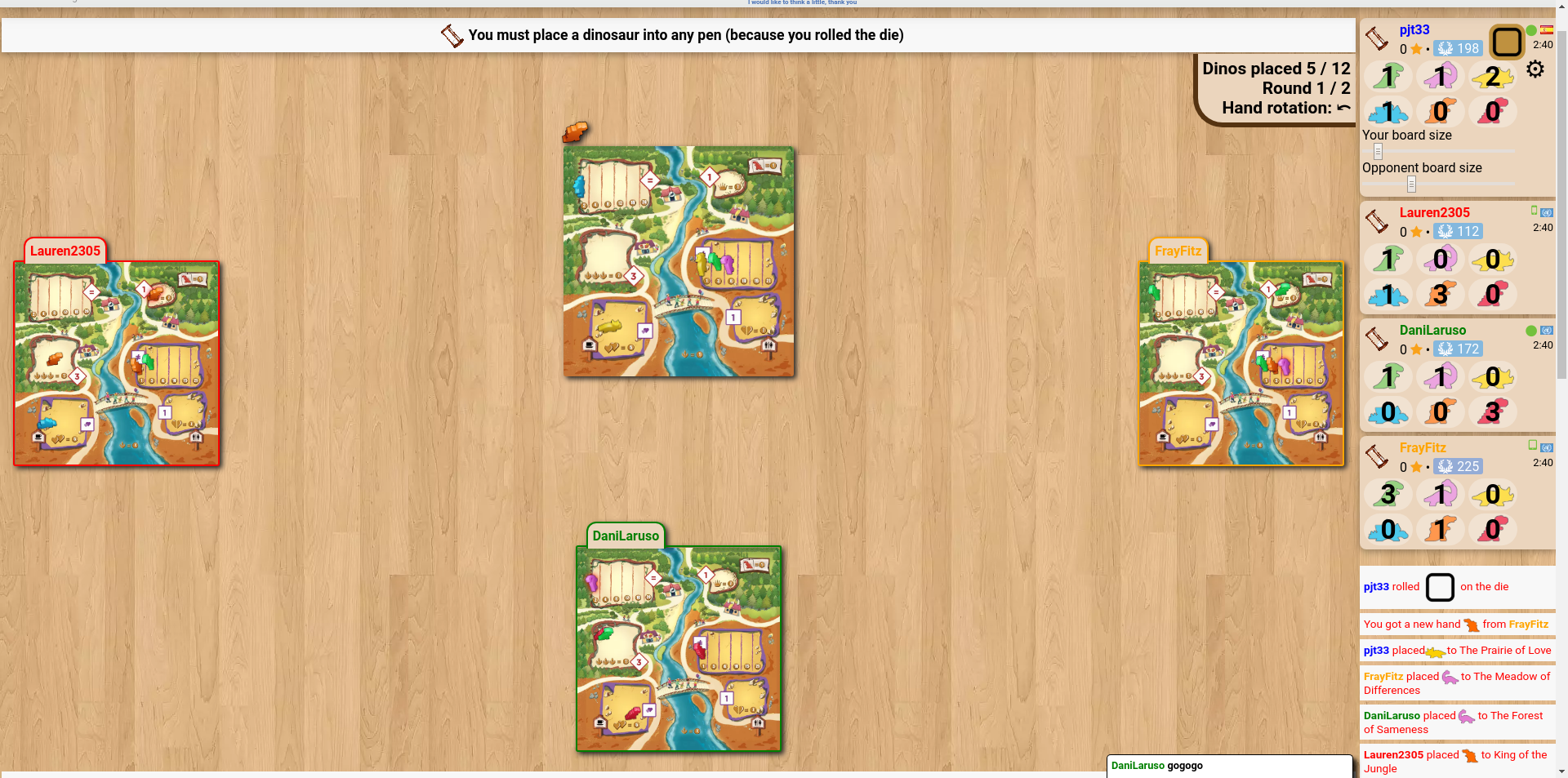
The sliders to change the sizes of the boards seem like a good idea, but my experience of trying to find a suitable size is that the problem isn't the board size but their position. It seems that the boards of the players to my left and right align with the bottom of the screen, and the boards of the fourth (and fifth, if applicable) player(s) go below the bottom of the screen unless using really tiny sizes.
cheddarmonk.org/forumimg/draftosaurus-initial-sizes.png and cheddarmonk.org/forumimg/draftosaurus-aligns-bottom.png show how making the opponent boards smaller pushes them down.
cheddarmonk.org/forumimg/draftosaurus-fixed-margin.png was the best that I could manage to get the boards to fit on screen without scrolling, and even then I had to scroll down a little and lose some of the header. This is with a maximised browser window on a 1920x1080 screen.
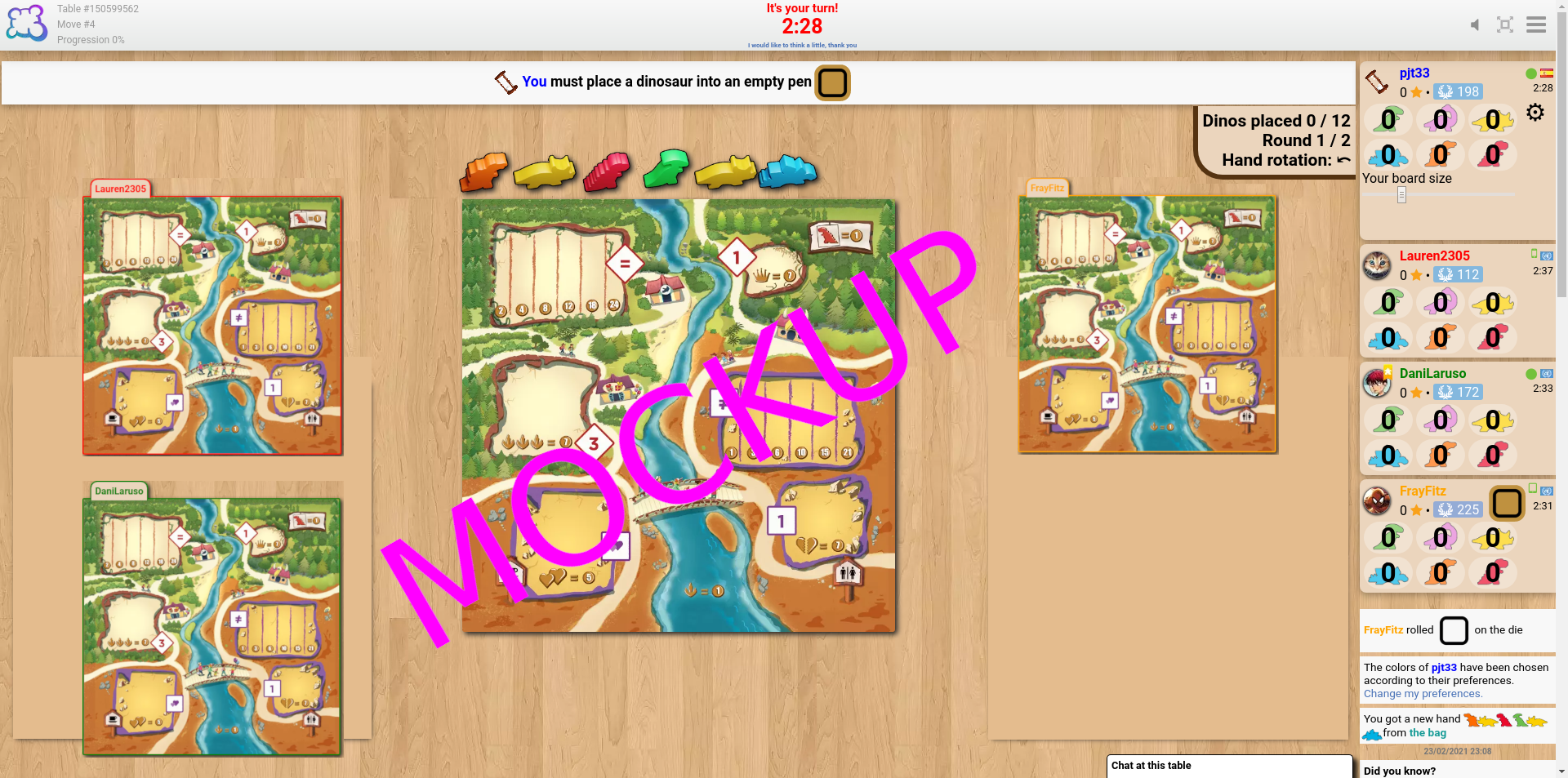
For desktop I think that it would work to have just one slider, for my own board size, and to fit the opponent boards into the left and right margins by calculating the scale factor which lets them both fit vertically, and the scale factor which lets them fit horizontally, and choosing the smaller of the two. I've made a mockup at cheddarmonk.org/forumimg/draftosaurus-mockup.png which shows how much larger the boards can be without scrolling. -
• Displegit deomp, mar-plij, ar pezh ho poa c'hoant d'ober, ar pezh ho peus graet hag ar pezh a zo c'hoarvezet 'benn ar fin
• Peseurt merdeer eo hoc'h hini ?
Google Chrome v79
-
• Mar-plij, eilit/pegit an destenn e Saozneg ha n'eo ket en ho yezh. If you have a screenshot of this bug (good practice), you can use a picture hosting service of your choice (snipboard.io for example) to upload it and copy/paste the link here. Ha dibres eo an destenn-mañ er sistem treiñ? Ma ya, daoust ha troet eo bet ouzhpenn 24 eur 'zo ?
The sliders to change the sizes of the boards seem like a good idea, but my experience of trying to find a suitable size is that the problem isn't the board size but their position. It seems that the boards of the players to my left and right align with the bottom of the screen, and the boards of the fourth (and fifth, if applicable) player(s) go below the bottom of the screen unless using really tiny sizes.
cheddarmonk.org/forumimg/draftosaurus-initial-sizes.png and cheddarmonk.org/forumimg/draftosaurus-aligns-bottom.png show how making the opponent boards smaller pushes them down.
cheddarmonk.org/forumimg/draftosaurus-fixed-margin.png was the best that I could manage to get the boards to fit on screen without scrolling, and even then I had to scroll down a little and lose some of the header. This is with a maximised browser window on a 1920x1080 screen.
For desktop I think that it would work to have just one slider, for my own board size, and to fit the opponent boards into the left and right margins by calculating the scale factor which lets them both fit vertically, and the scale factor which lets them fit horizontally, and choosing the smaller of the two. I've made a mockup at cheddarmonk.org/forumimg/draftosaurus-mockup.png which shows how much larger the boards can be without scrolling. • Peseurt merdeer eo hoc'h hini ?
Google Chrome v79
-
• Displegit ho kinnig mar-plij, e berrgomzoù met en un doare resis, evit ma vefe an aesañ posupl kompren mat ar pezh ho peus c'hoant lâret.
The sliders to change the sizes of the boards seem like a good idea, but my experience of trying to find a suitable size is that the problem isn't the board size but their position. It seems that the boards of the players to my left and right align with the bottom of the screen, and the boards of the fourth (and fifth, if applicable) player(s) go below the bottom of the screen unless using really tiny sizes.
cheddarmonk.org/forumimg/draftosaurus-initial-sizes.png and cheddarmonk.org/forumimg/draftosaurus-aligns-bottom.png show how making the opponent boards smaller pushes them down.
cheddarmonk.org/forumimg/draftosaurus-fixed-margin.png was the best that I could manage to get the boards to fit on screen without scrolling, and even then I had to scroll down a little and lose some of the header. This is with a maximised browser window on a 1920x1080 screen.
For desktop I think that it would work to have just one slider, for my own board size, and to fit the opponent boards into the left and right margins by calculating the scale factor which lets them both fit vertically, and the scale factor which lets them fit horizontally, and choosing the smaller of the two. I've made a mockup at cheddarmonk.org/forumimg/draftosaurus-mockup.png which shows how much larger the boards can be without scrolling. • Peseurt merdeer eo hoc'h hini ?
Google Chrome v79
-
• Petra oa diskouezet war ar skramm pa 'z oc'h chomet stanket (Skramm goullo ? Ul lodenn eus etrefas ar c'hoari ? Kemennadenn fazi ?)
The sliders to change the sizes of the boards seem like a good idea, but my experience of trying to find a suitable size is that the problem isn't the board size but their position. It seems that the boards of the players to my left and right align with the bottom of the screen, and the boards of the fourth (and fifth, if applicable) player(s) go below the bottom of the screen unless using really tiny sizes.
cheddarmonk.org/forumimg/draftosaurus-initial-sizes.png and cheddarmonk.org/forumimg/draftosaurus-aligns-bottom.png show how making the opponent boards smaller pushes them down.
cheddarmonk.org/forumimg/draftosaurus-fixed-margin.png was the best that I could manage to get the boards to fit on screen without scrolling, and even then I had to scroll down a little and lose some of the header. This is with a maximised browser window on a 1920x1080 screen.
For desktop I think that it would work to have just one slider, for my own board size, and to fit the opponent boards into the left and right margins by calculating the scale factor which lets them both fit vertically, and the scale factor which lets them fit horizontally, and choosing the smaller of the two. I've made a mockup at cheddarmonk.org/forumimg/draftosaurus-mockup.png which shows how much larger the boards can be without scrolling. • Peseurt merdeer eo hoc'h hini ?
Google Chrome v79
-
• Pesseurt reolenn n'eo ket doujet gant azasadenn ar c'hoari-mañ ?
The sliders to change the sizes of the boards seem like a good idea, but my experience of trying to find a suitable size is that the problem isn't the board size but their position. It seems that the boards of the players to my left and right align with the bottom of the screen, and the boards of the fourth (and fifth, if applicable) player(s) go below the bottom of the screen unless using really tiny sizes.
cheddarmonk.org/forumimg/draftosaurus-initial-sizes.png and cheddarmonk.org/forumimg/draftosaurus-aligns-bottom.png show how making the opponent boards smaller pushes them down.
cheddarmonk.org/forumimg/draftosaurus-fixed-margin.png was the best that I could manage to get the boards to fit on screen without scrolling, and even then I had to scroll down a little and lose some of the header. This is with a maximised browser window on a 1920x1080 screen.
For desktop I think that it would work to have just one slider, for my own board size, and to fit the opponent boards into the left and right margins by calculating the scale factor which lets them both fit vertically, and the scale factor which lets them fit horizontally, and choosing the smaller of the two. I've made a mockup at cheddarmonk.org/forumimg/draftosaurus-mockup.png which shows how much larger the boards can be without scrolling. -
• Ha posupl eo gwelet torridigezh ar reolenn e replay ar bartienn ? Ma 'z eo ya, da be niverenn taol ?
• Peseurt merdeer eo hoc'h hini ?
Google Chrome v79
-
• Peseurt taol ho peus c'hoant c'hoari ?
The sliders to change the sizes of the boards seem like a good idea, but my experience of trying to find a suitable size is that the problem isn't the board size but their position. It seems that the boards of the players to my left and right align with the bottom of the screen, and the boards of the fourth (and fifth, if applicable) player(s) go below the bottom of the screen unless using really tiny sizes.
cheddarmonk.org/forumimg/draftosaurus-initial-sizes.png and cheddarmonk.org/forumimg/draftosaurus-aligns-bottom.png show how making the opponent boards smaller pushes them down.
cheddarmonk.org/forumimg/draftosaurus-fixed-margin.png was the best that I could manage to get the boards to fit on screen without scrolling, and even then I had to scroll down a little and lose some of the header. This is with a maximised browser window on a 1920x1080 screen.
For desktop I think that it would work to have just one slider, for my own board size, and to fit the opponent boards into the left and right margins by calculating the scale factor which lets them both fit vertically, and the scale factor which lets them fit horizontally, and choosing the smaller of the two. I've made a mockup at cheddarmonk.org/forumimg/draftosaurus-mockup.png which shows how much larger the boards can be without scrolling. -
• Petra emaoc'h o klask ober evit delankañ an ober c'hoari-mañ ?
-
• What happened when you try to do this (error message, game status bar message, ...)?
• Peseurt merdeer eo hoc'h hini ?
Google Chrome v79
-
• Da be bazenn ar bartienn eo en em gavet ar gudenn (petra oa testenn kemenn ar c'hoari) ?
The sliders to change the sizes of the boards seem like a good idea, but my experience of trying to find a suitable size is that the problem isn't the board size but their position. It seems that the boards of the players to my left and right align with the bottom of the screen, and the boards of the fourth (and fifth, if applicable) player(s) go below the bottom of the screen unless using really tiny sizes.
cheddarmonk.org/forumimg/draftosaurus-initial-sizes.png and cheddarmonk.org/forumimg/draftosaurus-aligns-bottom.png show how making the opponent boards smaller pushes them down.
cheddarmonk.org/forumimg/draftosaurus-fixed-margin.png was the best that I could manage to get the boards to fit on screen without scrolling, and even then I had to scroll down a little and lose some of the header. This is with a maximised browser window on a 1920x1080 screen.
For desktop I think that it would work to have just one slider, for my own board size, and to fit the opponent boards into the left and right margins by calculating the scale factor which lets them both fit vertically, and the scale factor which lets them fit horizontally, and choosing the smaller of the two. I've made a mockup at cheddarmonk.org/forumimg/draftosaurus-mockup.png which shows how much larger the boards can be without scrolling. -
• What happened when you try to do a game action (error message, game status bar message, ...)?
• Peseurt merdeer eo hoc'h hini ?
Google Chrome v79
-
• Mar-plij, diskrivit kudenn an diskwel. If you have a screenshot of this bug (good practice), you can use a picture hosting service of your choice (snipboard.io for example) to upload it and copy/paste the link here.
The sliders to change the sizes of the boards seem like a good idea, but my experience of trying to find a suitable size is that the problem isn't the board size but their position. It seems that the boards of the players to my left and right align with the bottom of the screen, and the boards of the fourth (and fifth, if applicable) player(s) go below the bottom of the screen unless using really tiny sizes.
cheddarmonk.org/forumimg/draftosaurus-initial-sizes.png and cheddarmonk.org/forumimg/draftosaurus-aligns-bottom.png show how making the opponent boards smaller pushes them down.
cheddarmonk.org/forumimg/draftosaurus-fixed-margin.png was the best that I could manage to get the boards to fit on screen without scrolling, and even then I had to scroll down a little and lose some of the header. This is with a maximised browser window on a 1920x1080 screen.
For desktop I think that it would work to have just one slider, for my own board size, and to fit the opponent boards into the left and right margins by calculating the scale factor which lets them both fit vertically, and the scale factor which lets them fit horizontally, and choosing the smaller of the two. I've made a mockup at cheddarmonk.org/forumimg/draftosaurus-mockup.png which shows how much larger the boards can be without scrolling. • Peseurt merdeer eo hoc'h hini ?
Google Chrome v79
-
• Mar-plij, eilit/pegit an destenn e Saozneg ha n'eo ket en ho yezh. If you have a screenshot of this bug (good practice), you can use a picture hosting service of your choice (snipboard.io for example) to upload it and copy/paste the link here. Ha dibres eo an destenn-mañ er sistem treiñ? Ma ya, daoust ha troet eo bet ouzhpenn 24 eur 'zo ?
The sliders to change the sizes of the boards seem like a good idea, but my experience of trying to find a suitable size is that the problem isn't the board size but their position. It seems that the boards of the players to my left and right align with the bottom of the screen, and the boards of the fourth (and fifth, if applicable) player(s) go below the bottom of the screen unless using really tiny sizes.
cheddarmonk.org/forumimg/draftosaurus-initial-sizes.png and cheddarmonk.org/forumimg/draftosaurus-aligns-bottom.png show how making the opponent boards smaller pushes them down.
cheddarmonk.org/forumimg/draftosaurus-fixed-margin.png was the best that I could manage to get the boards to fit on screen without scrolling, and even then I had to scroll down a little and lose some of the header. This is with a maximised browser window on a 1920x1080 screen.
For desktop I think that it would work to have just one slider, for my own board size, and to fit the opponent boards into the left and right margins by calculating the scale factor which lets them both fit vertically, and the scale factor which lets them fit horizontally, and choosing the smaller of the two. I've made a mockup at cheddarmonk.org/forumimg/draftosaurus-mockup.png which shows how much larger the boards can be without scrolling. • Peseurt merdeer eo hoc'h hini ?
Google Chrome v79
-
• Displegit ho kinnig mar-plij, e berrgomzoù met en un doare resis, evit ma vefe an aesañ posupl kompren mat ar pezh ho peus c'hoant lâret.
The sliders to change the sizes of the boards seem like a good idea, but my experience of trying to find a suitable size is that the problem isn't the board size but their position. It seems that the boards of the players to my left and right align with the bottom of the screen, and the boards of the fourth (and fifth, if applicable) player(s) go below the bottom of the screen unless using really tiny sizes.
cheddarmonk.org/forumimg/draftosaurus-initial-sizes.png and cheddarmonk.org/forumimg/draftosaurus-aligns-bottom.png show how making the opponent boards smaller pushes them down.
cheddarmonk.org/forumimg/draftosaurus-fixed-margin.png was the best that I could manage to get the boards to fit on screen without scrolling, and even then I had to scroll down a little and lose some of the header. This is with a maximised browser window on a 1920x1080 screen.
For desktop I think that it would work to have just one slider, for my own board size, and to fit the opponent boards into the left and right margins by calculating the scale factor which lets them both fit vertically, and the scale factor which lets them fit horizontally, and choosing the smaller of the two. I've made a mockup at cheddarmonk.org/forumimg/draftosaurus-mockup.png which shows how much larger the boards can be without scrolling. • Peseurt merdeer eo hoc'h hini ?
Google Chrome v79
Roll-istor an danevelloù bog
I think laying our the boards in the same way as the game Lucky Numbers would be beneficial, as all of the boards are the same size and can be viewed at once without either resizing or scrolling.
Ouzhpennañ un dra bennak d'an danevell-mañ
- Niverenn taol all / Niverenn ar fiñv
- Ha renket eo bet ar gudenn gant an douchenn F5 ?
- Ha c'hoarvezet eo ar gudenn meur a wech ? Bewech ? Cheñch-dicheñch ?
- If you have a screenshot of this bug (good practice), you can use a picture hosting service of your choice (snipboard.io for example) to upload it and copy/paste the link here.